

Tutorial Generation
Ludo creates a custom, interactive development tutorial based on your game concept, designed to help you go from idea to a playable game.
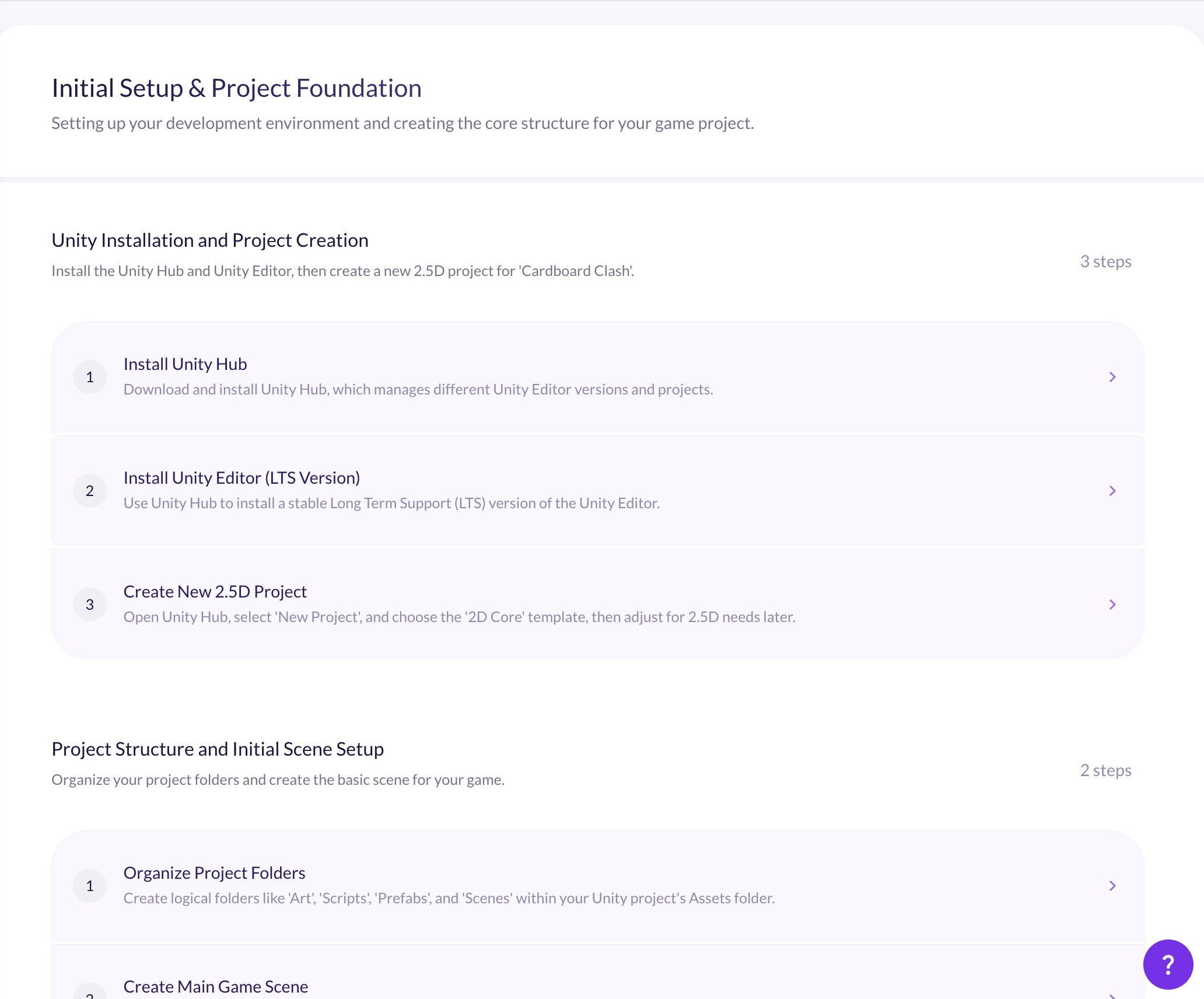
What is AI Tutorial Generation?
AI tutorial generation turns your game design document into a personalized, step-by-step development guide for the engine you choose. Ludo analyzes your concept's mechanics, features, and assets, then writes an ordered roadmap of topics and steps - complete with explanations and code snippets and tuned to your experience level - so you can build your specific game from initial setup through to final optimization.
How It Works
Finalize Your Concept
Complete your game's design in the Edit tab of the Game Concept tool so Ludo has the mechanics, features, and assets to build the guide from.
Generate Your Guide
Open the Tutorial tab, choose your experience level (Beginner or Advanced) and target engine, add an optional prompt to steer the focus, and click Generate.
Build Step by Step
Work through the generated topics and steps with their code snippets, and ask the built-in Ludo Assistant for help with implementation, troubleshooting, or best practices on any step.
FAQ
What is Tutorial Generation in Ludo?
It generates a unique, step-by-step development guide tailored to your game concept. Ludo analyzes your Game Design Document and produces a personalized roadmap - organized into topics and steps with instructions and code snippets - for the game engine you select, guiding you from initial setup through to final optimization.
Which game engines are supported?
You can generate a guide for Unity, Godot, Unreal, Roblox, Cocos2d-x, Buildbox, and Solar2D. The guide is tailored to your chosen engine's specific APIs and code conventions.
How is the tutorial personalized to my game?
The guide is built from your Game Concept. Ludo reads the unique mechanics, features, and assets described in your Game Design Document and writes a roadmap specific to that game, rather than a generic engine tutorial.
Can I choose my experience level?
Yes. Select Beginner for detailed explanations of core concepts, step-by-step guidance, and more code comments and examples, or Advanced for complex system architectures, optimization strategies, edge cases, and platform-specific considerations.
Does the guide include code?
Yes. Each step includes code snippets alongside the written instructions, tailored to the APIs and patterns of the engine you selected, so you can follow along and build directly in your project.
What if I get stuck on a step?
Every step has an integrated Ludo Assistant chat. You can ask it for clarifications, code explanations, troubleshooting help, or best practices specific to the step you are working on, without leaving the guide.
Can I customize or regenerate the guide?
Yes. You can add an optional prompt to steer what the guide focuses on, regenerate it with different settings, and keep multiple saved development guides for a project so you can revisit or compare different approaches.
Is tutorial generation available via API or MCP?
No. Tutorial generation is an in-app feature inside the Game Concept tool. Ludo's API and MCP integration cover asset generation - images, sprites, animation, 3D models, video, and audio - rather than development guides.